I’m a Solutions Architect at AWS Australia, where I help customers accelerate cloud migrations and modernize their infrastructure with cloud-native technologies. In my current role, I focus on AWS hybrid cloud services, platform engineering, and HPC / AI infrastructure. This blog is where I share hands-on labs, deep dives, and field notes from my work in cloud-native infrastructure and AI platform engineering. Opinions here are my own.

NKE Lab series – Ep5: Build a GitOps CD pipeline using GitHub, NKE and Argo CD
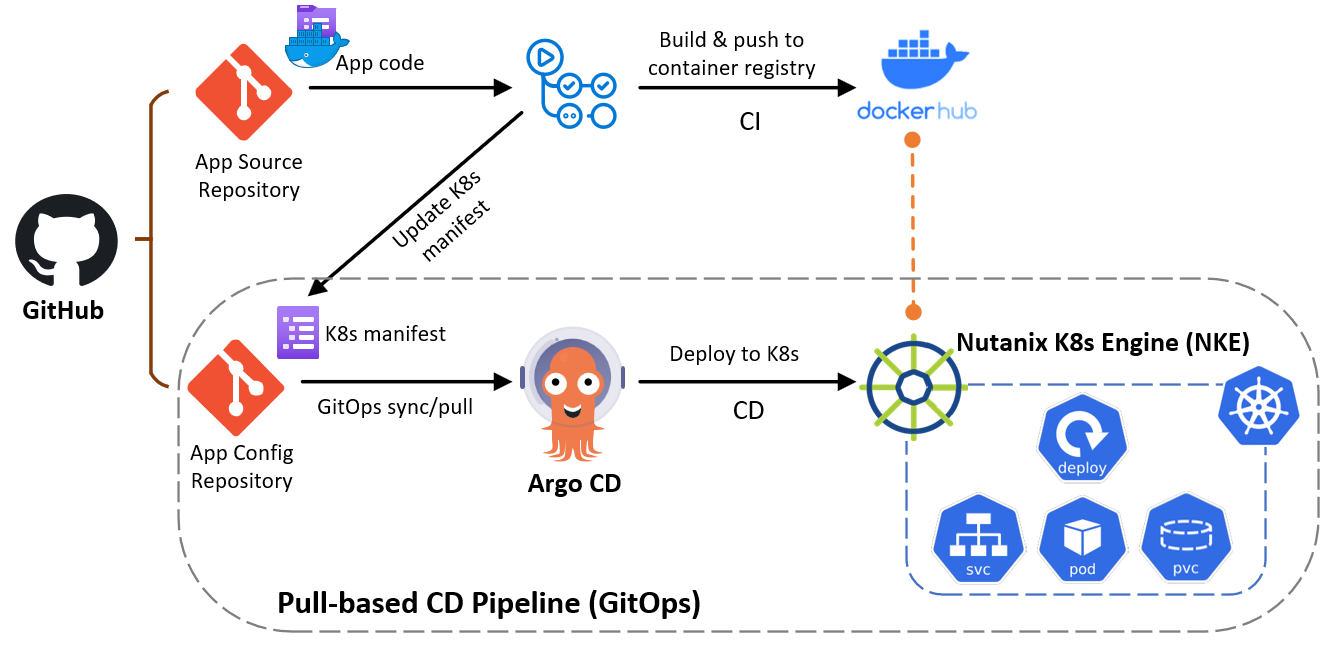
This is the 5th episode of our NKE lab series. In this episode, I will demonstrate how you can easily build a fully-automated GitOps continues delivery (CD) pipeline, by using Github, NKE and Argo CD. GitOps is a operational framework that takes DevOps best practices (such as version control, Infra-as-Code, CI/CD etc), and applies them to modern and cloud native infrastructure such as Kubernetes-based clusters. There are two GitOps approaches: Push-based and Pull-based, and you can reach more about each model at here. This post will focus on the Pull-based approach as it provides many benefits such as better version control and governance, more automation and self-service capabilities, and easier for rollback, auditing/compliance suitable for large and stable production environment. ...

NKE Lab series – Ep4: Accelerate K8s application development using NKE with Nutanix Database (NDB)
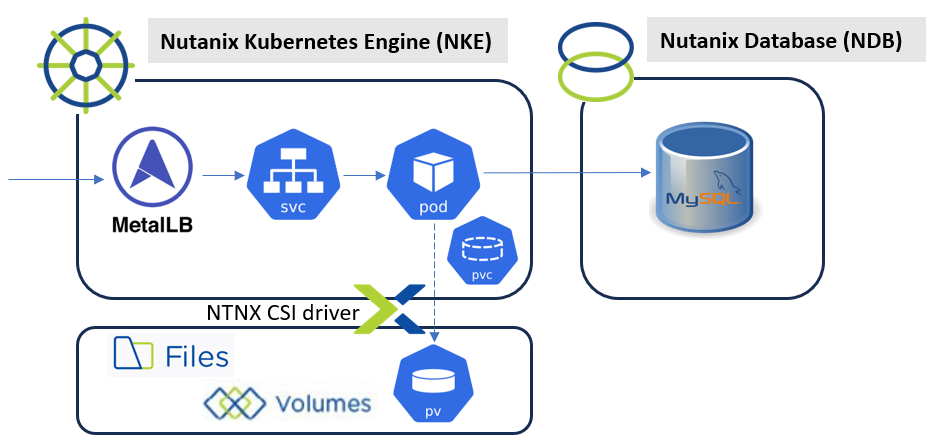
This is the 4th episode of our NKE lab series. Previously, I have demonstrated how you can easily deploy a NKE cluster in a Nutanix CE lab environment, and I have explored some NKE platform features including out-of-the-box CSI and CNI support. In this episode, we’ll take a look how you can accelerate Kubernetes application development by integrating NKE with Nutanix Database Service (NDB). NDB is a Database-as-a-Service designed to help developers speed up application development and simplify database administration across on-prem and public clouds. It simplifies database operations such as test DB provisioning/cloning and integrated snapshots/backup etc. It also provides a consistent “Database-as-Code” experience using REST API and K8s integrations. NDB supports most popular database engines, and you can read more about it at here. ...

NKE lab series – Ep3: Deep dive into NKE networking with Calico CNI
This is the 3rd episode of our NKE lab series. Previously, I have walked through: How to deploy a NKE-enabled Kubernetes cluster in a nested Nutanix CE environment How to provide persistent storage to your NKE clusters using 2x Nutanix CSI options In this episode, we’ll deep dive into the NKE networking spaces by exploring the following: PART-1: Exploring Calico CNI deployment models within a NKE cluster PART-2: Applying standard Kubernetes network policy in a NKE cluster PART-3: Leveraging Calico specific policies in a NKE cluster pre-requisites a 1-node or 3-node Nutanix CE 2.0 cluster deployed in nested virtualization depending on your lab compute capacity, as documented here and here a NKE-enabled K8s cluster deployed in Nutanix CE (see Ep1) a Guestbook demo app deployed onto the NKE cluster (see Ep2) a lab network environment supports VLAN tagging and provides basic infra services such as AD, DNS, NTP etc (these are required when installing the CE cluster) a Linux/Mac workstation for managing the Kubernetes cluster, with Kubectl installed PART-1: Exploring Calico CNI models in NKE Calico is recognized as the most popular CNI plugins within he Kubernetes community, and it has been widely deployed in production thanks to its reliable performance and comprehensive networking and security features. ...

NKE lab series – Ep2: Deploy a multi-tier web application on a NKE cluster using persistent storage with Nutanix CSI
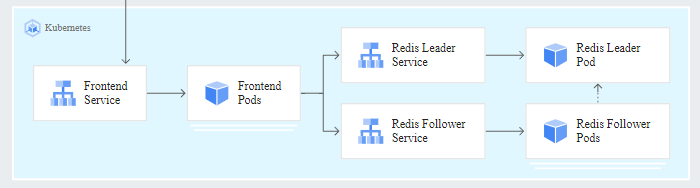
This is the 2nd episode of our NKE lab series. In the 1st episode, I have demonstrated how you can easily deploy an enterprise-grade NKE cluster in a Nutanix CE lab environment with nested virtualization. In this episode, we’ll deploy a containerized multi-tier web application onto our NKE cluster, by leveraging the built-in Nutanix CSI driver to provide persistent storage for the demo app. Specifically, we’ll explore 2x Nutanix CSI options: ...

Nutanix Kubernetes Engine (NKE) lab series – Ep1: Create a NKE-enabled Kubernetes Cluster on Nutanix Community Edition (CE)
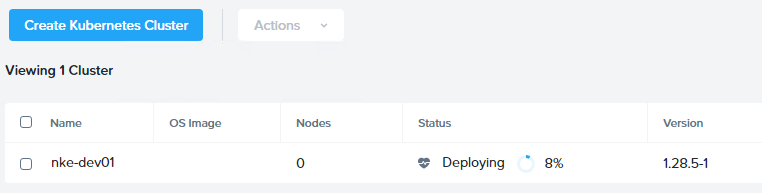
This blog is the 1st episode of a Nutanix Kubernetes Engine (NKE) home lab series. In this post, I will walk through the detailed process of deploying an enterprise-ready NKE-enabled Kubernetes cluster within a Nutanix CE environment. Nutanix CE is a free version of Nutanix AOS, which powers the Nutanix Enterprise Cloud Platform. It is designed for people interested in test driving Nutanix platform features and capabilities in a non-production or PoC environment. Even better, Nutanix CE also works in a nested virtualization deployment on top of ESXi/vSphere. This makes it perfect for hands-on testing or exploring in a safe environment such as home-lab, which is exactly what I’m running here! ...

Integrate F5 Load Balancers into VMware Cloud on AWS SDDC Environment
With the recent release of VMware Cloud on AWS SDDC version 1.18, we have introduced a ton of advanced networking capabilities which opened up possibilities for many new interesting use cases. Customers can now utilise the NSX Manager UI (or VMC Policy API) to configure route aggregation at each SDDC level, and this provides an efficient way to solve the 100 DX route limit. Customer can also create additional Tier-1 Compute Gateways (Multi-CGWs) with static route injection capabilities to address different requirements such as network multi-tenancy, overlapping IPv4 environments and integrating with 3rd-party network & security appliances etc. You can read more details about the new features at here. ...

Provision and integrate iSCSI storage with VMware Cloud on AWS using Amazon FSx for NetApp ONTAP
With the recently announced Amazon FSx for NetApp ONTAP, it is very exciting that for the first time we have a fully managed ONTAP file system in the cloud! What’s more interesting about this service is that we can now deliver high-performance block storage to the workloads running on VMware Cloud on AWS (VMC) through a first-party Amazon managed service! In this post I will walk you through a simple example for provisioning and integrating iSCSI-based block storage to a Windows workload running on VMC environment using Amazon FSx for NetAPP ONTAP. For this demo I’ve provisioned the FSx service in a shared service VPC, which is connected to the VMC SDDC cluster through an AWS Transit Gateway (TGW) via VPN attachment (as per below diagram). ...

Integrating a 3rd-party firewall appliance with VMware Cloud on AWS by leveraging a Security/Transit VPC
With the latest “Transit VPC” feature in the VMware Cloud on AWS (VMC) 1.12 release, you can now inject static routes in the VMware managed Transit Gateway (or VTGW) to forward SDDC egress traffic to a 3rd-party firewall appliance for security inspection. The firewall appliance is deployed in a Security/Transit VPC to provide transit routing and policy enforcement between SDDCs and workload VPCs, on-premises data center and the Internet. Important Notes: ...

Create a Tiny Core Linux VM Template for vSphere Lab environment
I’ve always wanted to find a lightweight VM template for running on nested vSphere lab environment, or sometimes for demonstrating live cloud migration such as vMotion to the VMware Cloud on AWS. Recently I have managed to achieve this by using the Tiny Core Linux distribution and it ticked all of my requirements: ultra lightweight – the VM runs stable with only 1 vCPU, 256MB RAM and 64MB hard disk! common linux tools installed – such as curl, wget, openssh etc open-vm-tools installed a lightweight http server serving a static site for running networking or load-balancing tests In this post I will walk you through the process for creating a Tiny Core based Linux VM template including all of the above requirements. To begin, download the Tiny Core ISO from here. (For reference, I’m using the CorePlus-v11.1 release as I was getting some weird issues with OpenSSH on the latest v12.0 release) ...

NSX-T Automation with Terraform
Recently I have tried out the Terraform NSX-T Provider and it worked like a charm. In this post, I will demonstrate a simple example on how to leverage Terraform to provision a basic NSX tenant network environment, which includes the following: create a Tier-1 router create (linked) routed ports on the new T1 router and the existing upstream T0 router link the T1 router to the upstream T0 router create three logical switches with three logical ports create three downlink LIFs (with subnets/gateway defined) on the T1 router, and link each of them to the logical switch ports accordingly Once the tenant environment is provisioned by Terraform, the 3x tenant subnets will be automatically published to the T0 router and propagated to the rest of the network (if BGP is enabled), and we should be able to reach the individual LIF addresses. Below is a sample topology deployed in my lab — (here I’m using pre-provisioned static routes between the T0 and upstream network for simplicity reasons). ...